Page 15 of 89
Re: Weather34 MB-SMART NANOSD TEMPLATE
Posted: Sun Dec 29, 2019 4:56 pm
by rzelle-K1TTC
Hi Brian,
Happy New Year, The Templates are looking Great I've dedicated and iPad for use with mostly the Altenative Template however the Main Template looks Great on it using Safari as well.
My site has been kept up to date and as of 0945 EST .
A suggestion on the Altenative Charts pages can you show the chart name being displayed possibility in a slightly lager font in the center of the Option bar at the bottom?
Thank You! Great Work and a Great Way to start the New Year.
73s
..Ron
https://weather.k1ttc.com/index.php
Re: Weather34 MB-SMART NANOSD TEMPLATE
Posted: Sun Dec 29, 2019 7:43 pm
by weatherist34
Hello Ron
do you mean something like this the colored ones it will fall apart when using other languages when increasing the font size so I can do something like this ? in the bottom tab bar let me know before end of 30th December I want wrap it all up for a while and take some time to polish off these app versions.its a whole new language but surprisingly easy to adapt too..

- Screenshot at Dec 29 21-00-20.png (128.79 KiB) Viewed 5325 times

- Screenshot at Dec 29 20-58-27.png (127.83 KiB) Viewed 5327 times
Re: Weather34 MB-SMART NANOSD TEMPLATE
Posted: Sun Dec 29, 2019 9:42 pm
by prestwickwx
weatherist34 wrote: Sun Dec 29, 2019 10:30 am
good morning chuck
console alternative layout uses device time can be changed to 24hr or 12 hr just by a simple adjustment .alternative layout intended for OEM tablets etc so it was easier to compile a time script to use device time. (will post sometime in January to adjust between 24hr to 12hr)
also last night finally got around to updating the php version on my local Mac mini to php 7.4.1 amazingly faster than previous 7.3 versions.glad to report
I saw no anomalies.
new notification design layout was added to version 2.0 this morning, once again you can disable via the setup screen if not required.see below
*note all updates/fixes after 1st January are done by the MB-SMART update please keep an eye on
https://weather34.com/homeweatherstatio ... smart.html update box for simple updates but lets hope there is none ..
*to all that have requested a feature via email/pm etc Im really sorry many of those require some thought and time, most of all weighing the overall use for everyone. * I detest scraping data especially in iframe and pulling down large images from another website this approach requires a lot of time to keep monitoring and going as you have no control over any external website not run by yourselves , they can change things, shift the url, some use extremely large GIF images that almost the same size of the website template so Im sorry its a NO from me but you are free to implement in anyway you want its your website at the end of day .
Even official API data can give you headaches at times so the best data is your data where at least you have some control or possibility to resolve

have fun and look out for the apps sometime soon quite excited and happy about the outcome..Brian
7.4-alert.jpg
3.jpg
Brian,
Looking forward to the APPS and trying PHP 7.4 - using 7.3.8 presently. I suspect the (our) web host will provide 7.4 soon.
Have a great 2020!
Chuck
Re: Weather34 MB-SMART NANOSD TEMPLATE
Posted: Sun Dec 29, 2019 10:32 pm
by rzelle-K1TTC
What you show is perfect as long as it's not too difficult to do given language issues.
Thanks,
..Ron
Re: Weather34 MB-SMART NANOSD TEMPLATE
Posted: Sun Dec 29, 2019 11:15 pm
by weatherist34
Ok Ron all done with updated language files .
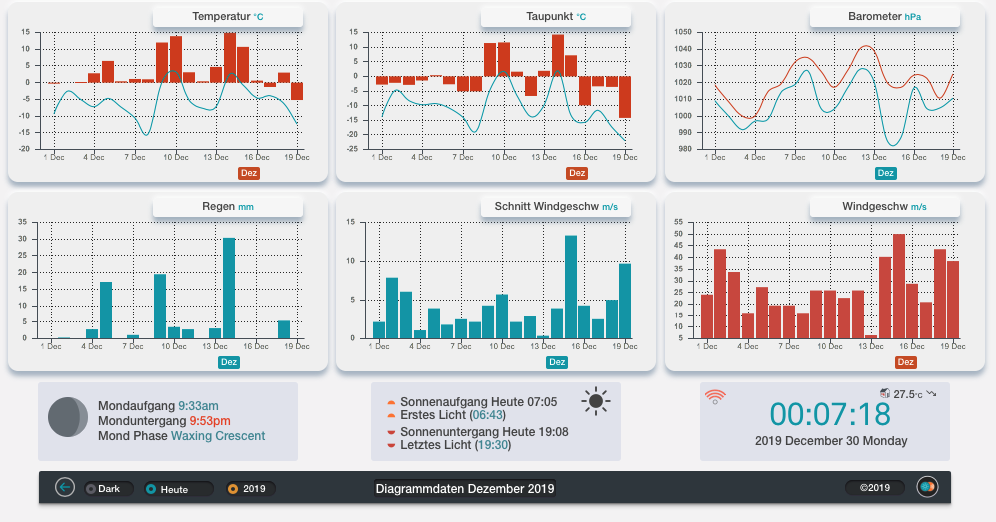
- Screenshot at Dec 30 00-07-25.png (116.5 KiB) Viewed 5312 times
Re: Weather34 MB-SMART NANOSD TEMPLATE
Posted: Sun Dec 29, 2019 11:39 pm
by rzelle-K1TTC
Perfectr!
Thanks
..Ron
Re: Weather34 MB-SMART NANOSD TEMPLATE
Posted: Sun Dec 29, 2019 11:50 pm
by rzelle-K1TTC
Just noticed the option bar at bottom in alternative stay dark in Light mode. I use dark 99% of the time so just noticing.
..Ron
Re: Weather34 MB-SMART NANOSD TEMPLATE
Posted: Sun Dec 29, 2019 11:55 pm
by rzelle-K1TTC
Brian, Never mind I see it's intentional via last screen shot you sent
.. Ron..
Re: Weather34 MB-SMART NANOSD TEMPLATE
Posted: Mon Dec 30, 2019 3:23 pm
by rzelle-K1TTC
Brian, Very Nice enhanced to the Alternative Chart titles
..Ron
Re: Weather34 MB-SMART NANOSD TEMPLATE
Posted: Mon Dec 30, 2019 6:56 pm
by Lespius
Hello Brian,
Discovering Weather34 for a few days and playing with it. It is a cool tool !
My main page is with Meteotemplate, but Weather34 is a nice alternative.
As far as the Console screen is concerned, I noticed that the time that is displayed at the bottom right is MY local time, and not the local time at the station place. This is correct on the main regular screen.
Happy New Year to all
Alain (Switzerland)
http://www.meteo-cugy.ch
http://www.meteo-cugy.ch/MBSMART/index.php#
Re: Weather34 MB-SMART NANOSD TEMPLATE
Posted: Mon Dec 30, 2019 11:34 pm
by weatherist34
Hello welcome
I have just done it but I hope it is of use and have fun.
you can see here for the station in Singapore should reflect there time .
http://singaporeweather.info/console/consoledavis.php
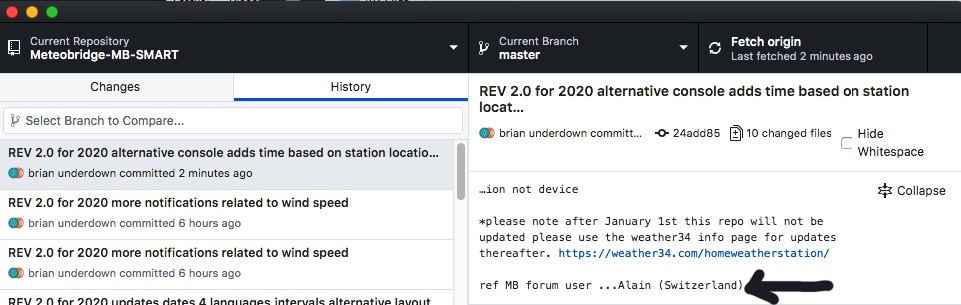
- alain.jpg (113.24 KiB) Viewed 5244 times
Re: Weather34 MB-SMART NANOSD TEMPLATE
Posted: Tue Dec 31, 2019 3:33 pm
by rzelle-K1TTC
Happy New Year Brian, Getting ready to celebrate this evening here hope your New Years eve has been fun and safe ..
I have one suggestion regarding Console Time can it have a 24hr option?
73s
..Ron
Re: Weather34 MB-SMART NANOSD TEMPLATE
Posted: Tue Dec 31, 2019 7:53 pm
by xxvincixx
hello Brian, I just installed version 2.0, everything went well except for the problem that I report in the photo ... what should I do to fix it ??
Re: Weather34 MB-SMART NANOSD TEMPLATE
Posted: Tue Dec 31, 2019 8:23 pm
by weatherist34
rzelle-K1TTC wrote: Tue Dec 31, 2019 3:33 pm
Happy New Year Brian, Getting ready to celebrate this evening here hope your New Years eve has been fun and safe ..
I have one suggestion regarding Console Time can it have a 24hr option?
73s
..Ron
You too Ron we go off to the sea front for one of those booming firework displays only 5 minutes walk but bitterly cold this year so won't leave till 11:45pm
I added the option so there is a simple new option in setup panel for alternative layout screenshot below should make it simple to understand and also made the clock modules fully language supported.
see ya all ..Brian
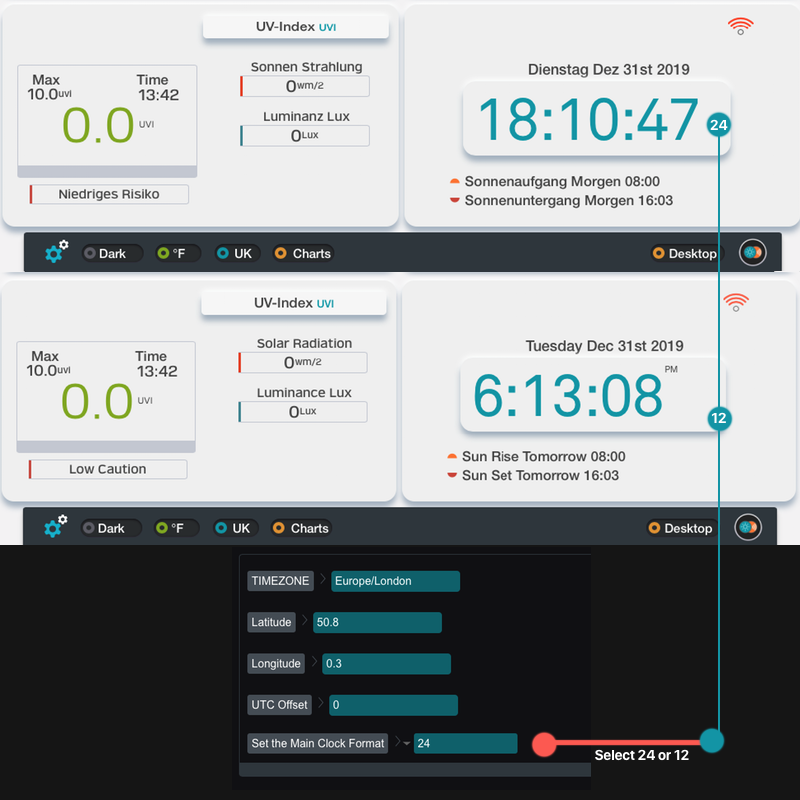
- 24-12.png (203.18 KiB) Viewed 5202 times
Re: Weather34 MB-SMART NANOSD TEMPLATE
Posted: Tue Dec 31, 2019 8:29 pm
by weatherist34
xxvincixx wrote: Tue Dec 31, 2019 7:53 pm
hello Brian, I just installed version 2.0, everything went well except for the problem that I report in the photo ... what should I do to fix it ??
Good evening
I would probably guess its lat/lon related ? timezone related generally what causes that module to go blank when either a typo or a hidden space is inserted or incorrect typed timezone structure . if you get stuck pm url with password to setup which you can change at any time .
if possible pm before end of tomorrow of on our travels again..