Page 1 of 1
System Variables timestamp **solved**
Posted: Mon Mar 28, 2016 7:00 am
by satellitedan
First post! I've been using meteobridge for about a week or so and every day I'm learning something new.
There are a few things I could not find the answer to as far as making an email/twitter script.
Is there a way to remove a leading zero from a timestamp? For example, I would like 08:20am to show up as 8:20am. I've figured out the am/pm thing but not how to remove the leading zero.
The sunrise/sunset & moonrise/moonset timestamps are in 24hr time. Is there a way to convert it to 12hr time?
I've tried [mbsystem-sunset=apm] but that only returns the 24hr time (19:40) instead of 12hr time (7:40).
The actual time is correct, I just can't figure out how to make it display 12hr time.
Thanks!
Re: System Variables timestamp
Posted: Mon Mar 28, 2016 12:27 pm
by admin
"apm" converter is not defined for sunset/sunrise. I will add this with one of the next updates.
Regarding the leading zero, in which situation are you looking to get rid of it?
Re: System Variables timestamp
Posted: Mon Mar 28, 2016 12:45 pm
by satellitedan
Thank you!
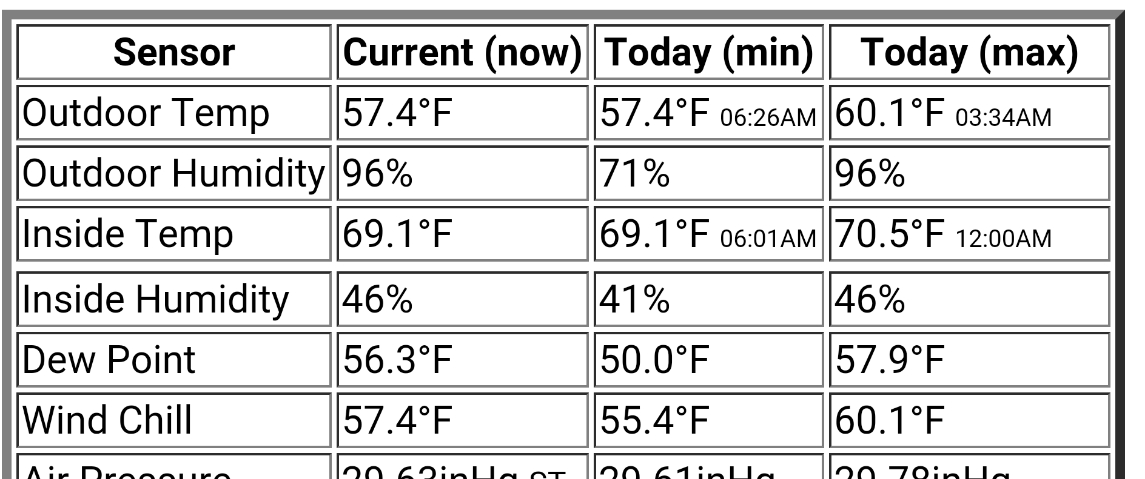
I have a timestamp on a few things, like the min/max temperature. It returns with the leading zero (see attached)
- IMG_20160328_064020.jpg (238.27 KiB) Viewed 6847 times
Sorry for the large size, I uploaded it from my phone.
Re: System Variables timestamp
Posted: Mon Mar 28, 2016 5:29 pm
by admin
You can select the to be skipped character and make use of an #if# #then# #else# #fi# clause to skip the leading char if it is a zero.
When you post one of your timestamp variable definitions, I can show as an example how to apply this.
Re: System Variables timestamp
Posted: Mon Mar 28, 2016 11:34 pm
by satellitedan
I appreciate the help. Here is the code for the first line in the table image I posted earlier:
<tr><td>Outdoor Temp</td><td>[th0temp-act=F.1:--]°F</td><td>[th0temp-dmin=F.1:--]°F <font size='1'>[th0temp-dmintime=apm.ij:--]:[th0temp-dmintime.kl][th0temp-dmintime=apm.op]<font size='3'></td><td>[th0temp-dmax=F.1:--]°F <font size='1'>[th0temp-dmaxtime=apm.ij]:[th0temp-dmaxtime.kl][th0temp-dmaxtime=apm.op]<font size='3'></td></tr>
Re: System Variables timestamp
Posted: Tue Mar 29, 2016 3:05 am
by satellitedan
admin wrote:"apm" converter is not defined for sunset/sunrise. I will add this with one of the next updates.
Thank you for adding this!
Re: System Variables timestamp
Posted: Wed Mar 30, 2016 5:29 pm
by satellitedan
I just realized that am & pm do not show up for moonrise/moonset. It is fine for sunrise/sunset.
Here is the code I have for that:
Sunrise [mbsystem-sunrise=apm] - Sunset [mbsystem-sunset=apm]<br>Moonrise [mbsystem-moonrise=apm:NoData] - Moonset [mbsystem-moonset=apm:NoData]
This is how it shows up:

- Clipboard01.png (21.75 KiB) Viewed 6793 times
Re: System Variables timestamp
Posted: Sun Apr 03, 2016 1:51 pm
by admin
Latest update should that have fixed. AM/PM display option also surpresses leading zeros in the hours field.
Re: System Variables timestamp
Posted: Wed Apr 20, 2016 11:42 am
by satellitedan
admin wrote:Latest update should that have fixed. AM/PM display option also surpresses leading zeros in the hours field.
Much appreciated!
Re: System Variables timestamp **solved**
Posted: Wed Jun 27, 2018 10:54 pm
by SANdood
In version 3.7, =apm no longer has any affect on the output for moonrise/moonset (=utc does, though).
My code (is creating a JSON Map):
Code: Select all
/cgi-bin/template.cgi?template={"moonrise":"[mbsystem-moonrise=apm:null]"}&contenttype=application/json;charset=utf-8
Re: System Variables timestamp **solved**
Posted: Sat Jun 30, 2018 9:04 am
by admin
Are you sure that works as you expected in 3.6? Please give it a try. I am no aware that I did changes there, so please confirm that it is a 3.7 bug before I start investing time again on this.
Re: System Variables timestamp
Posted: Sun Apr 21, 2019 11:56 am
by n8911
admin wrote: Mon Mar 28, 2016 5:29 pm
You can select the to be skipped character and make use of an #if# #then# #else# #fi# clause to skip the leading char if it is a zero.
When you post one of your timestamp variable definitions, I can show as an example how to apply this.
I too am looking to get rid of a leading zero in a string. I am trying to figure out how to do this but do not see an example. Anyway you can help me out?