Search found 46 matches
- Mon Aug 03, 2026 3:51 am
- Forum: Meteobridge PRO/PRO2/NANOSD/RPI/VM Discussion
- Topic: Indoor temp is 112 degrees F! Help Please
- Replies: 6
- Views: 439
Re: Indoor temp is 112 degrees F! Help Please
My console and Pro2 are indoors near an exterior wall that’s 15 feet from the sensor suite. The signal strength is in the 50’s.
- Sun Aug 02, 2026 6:42 pm
- Forum: Meteobridge PRO/PRO2/NANOSD/RPI/VM Discussion
- Topic: Indoor temp is 112 degrees F! Help Please
- Replies: 6
- Views: 439
Re: Indoor temp is 112 degrees F! Help Please
If you just want something in the ballpark, you can add an offset to thb0temp. I’ve got mine set at -25.7 degrees. It’s close enough.
- Fri May 08, 2026 10:24 pm
- Forum: Meteobridge PRO/PRO2/NANOSD/RPI/VM Discussion
- Topic: WB Pro2: Unable To Remote Login. **solved**
- Replies: 2
- Views: 326
Re: WB Pro2: Unable To Remote Login
I rebooted the WB Pro2. The Remote Login URL changed and it now works.
- Wed May 06, 2026 7:45 pm
- Forum: Meteobridge PRO/PRO2/NANOSD/RPI/VM Discussion
- Topic: WB Pro2: Unable To Remote Login. **solved**
- Replies: 2
- Views: 326
WB Pro2: Unable To Remote Login. **solved**
I enabled a WB Pro2 for remote login:
https://roloff.synology.me/RemoteLogin.jpg
When trying to access the remote login URL, an error message appears:
https://roloff.synology.me/Oops.jpg
I have successfully used remote login for a different WB Pro2, as well as a Nano SD.
If need be, I can ...
https://roloff.synology.me/RemoteLogin.jpg
When trying to access the remote login URL, an error message appears:
https://roloff.synology.me/Oops.jpg
I have successfully used remote login for a different WB Pro2, as well as a Nano SD.
If need be, I can ...
- Thu Jan 08, 2026 8:10 am
- Forum: Meteobridge PRO/PRO2/NANOSD/RPI/VM Discussion
- Topic: Ecowitt Custom Upload and HP2550C Console - no data moving
- Replies: 6
- Views: 675
Re: Ecowitt Custom Upload and HP2550C Console - no data moving
Under System->Administration->Security you can enable remote login. It’s a convenient way to manage your devices remotely.
- Wed Jan 07, 2026 7:14 am
- Forum: Meteobridge PRO/PRO2/NANOSD/RPI/VM Discussion
- Topic: Ecowitt Custom Upload and HP2550C Console - no data moving
- Replies: 6
- Views: 675
Re: Ecowitt Custom Upload and HP2550C Console - no data moving
So the Monitor->Live Data shows parameters with zero values?
- Thu Jan 01, 2026 3:58 am
- Forum: Meteobridge PRO/PRO2/NANOSD/RPI/VM Discussion
- Topic: Ecowitt Custom Upload Pressure Parameters
- Replies: 0
- Views: 234
Ecowitt Custom Upload Pressure Parameters
I'm testing uploading data into a Pro2 via the "Ecowitt Custom Upload" procedure. I've successfully uploaded: temperature, humidity, rain, wind, uv and solar radiation values. The values for sea level and relative pressures don't show up in Monitor Min/Max screen (the Pro2 internal system values do ...
- Tue Dec 30, 2025 5:13 am
- Forum: Meteobridge PRO/PRO2/NANOSD/RPI/VM Discussion
- Topic: Erase All Data. **solved**
- Replies: 2
- Views: 336
Re: Erase All Data
Good advice.
I overlooked the Database tab; it isn't shown in the Wiki:
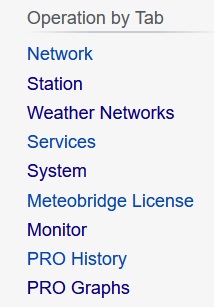
I overlooked the Database tab; it isn't shown in the Wiki:
- Tue Dec 30, 2025 3:10 am
- Forum: Meteobridge PRO/PRO2/NANOSD/RPI/VM Discussion
- Topic: Erase All Data. **solved**
- Replies: 2
- Views: 336
Erase All Data. **solved**
I have a new Pro2 that I wish to test by uploading some bogus data, similar to a User-Defined Station. I won't be uploading the bogus data to any weather servers. I don't want to keep the bogus data after my testing. Is there a way to delete all of this data (without effecting the Pro2 settings)?
- Tue Dec 16, 2025 10:01 pm
- Forum: Meteobridge PRO/PRO2/NANOSD/RPI/VM Discussion
- Topic: Pro 2 With AW WS-5000
- Replies: 17
- Views: 1590
Re: Pro 2 With AW WS-5000
What makes more sense would be to create a meteobridge cgi file to accept either Ambient Weather Protocol or Weather Underground Protocol data. Thus meteobridge would be able to input data from any current or future Ambient Weather console that supports custom uploads.
Any chance someone has done ...
Any chance someone has done ...
- Tue Dec 16, 2025 2:38 am
- Forum: Meteobridge PRO/PRO2/NANOSD/RPI/VM Discussion
- Topic: Pro 2 With AW WS-5000
- Replies: 17
- Views: 1590
Re: Pro 2 With AW WS-5000
Yes, there is a console but it only has two options for custom uploads: Ambient Weather Protocol or Weather Underground Protocol. Will either one of those two work with ecowitt0.cgi?
- Tue Dec 16, 2025 12:43 am
- Forum: Meteobridge PRO/PRO2/NANOSD/RPI/VM Discussion
- Topic: Pro 2 With AW WS-5000
- Replies: 17
- Views: 1590
Re: Pro 2 With AW WS-5000
Excellent. Now I just need to track down a console for the HP2553 ...
Thanks!
Thanks!
- Sat Dec 13, 2025 3:53 am
- Forum: Meteobridge PRO/PRO2/NANOSD/RPI/VM Discussion
- Topic: Pro 2 With AW WS-5000
- Replies: 17
- Views: 1590
Re: Pro 2 With AW WS-5000
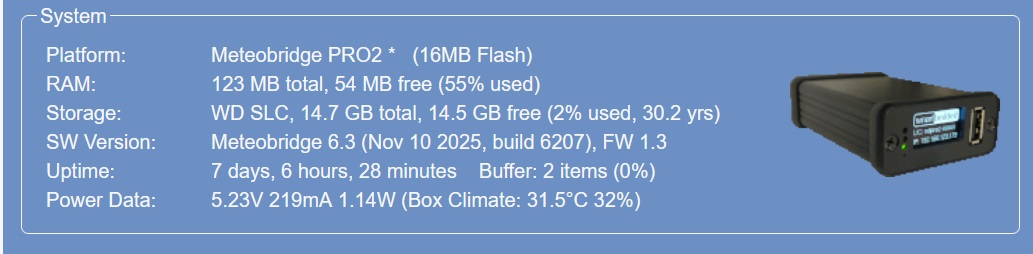
The Pro2 is running version 6.3
- Sat Dec 13, 2025 3:45 am
- Forum: Meteobridge PRO/PRO2/NANOSD/RPI/VM Discussion
- Topic: Pro 2 With AW WS-5000
- Replies: 17
- Views: 1590
Re: Pro 2 With AW WS-5000
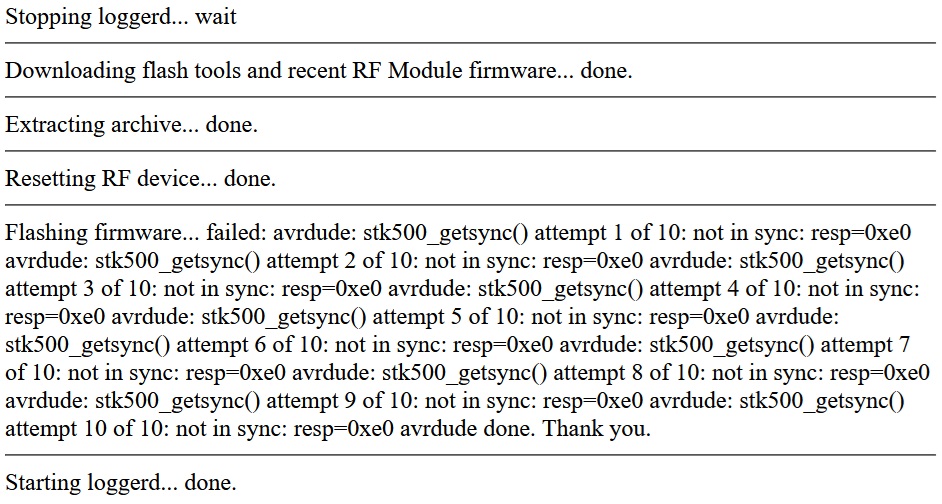
I tried the RF Module Update a 2nd time. It produced the screen and log file shown below. After waiting 10 minutes for the "Flashing firmware..." to append "done.", I gave up. I tried again to change the primary station to the WS80 and again the log file showed the same error:
Error: WS90 operation ...
Error: WS90 operation ...
- Fri Dec 12, 2025 6:54 pm
- Forum: Meteobridge PRO/PRO2/NANOSD/RPI/VM Discussion
- Topic: Pro 2 With AW WS-5000
- Replies: 17
- Views: 1590
Re: Pro 2 With AW WS-5000
I had not updated the RF Module. When I tried, I received the following screen: